
Below you can find a list of recommended DNS records. While some are mandatory for a mail server (MX and CNAME records), others are recommended to build a good reputation score (TXT/SPF, DKIM) or used for auto-configuration of mail clients.
| Name/Host | Type | Priority | Value | Comment |
|
Blank/empty or @ |
MX |
10 |
mail.op-email.eu |
Required for receiving incoming emails. |
|
autodiscover |
CNAME |
mail.op-email.eu |
|
|
|
autoconfig |
CNAME |
mail.op-email.eu |
|
|
|
Blank/empty or @ |
TXT |
"v=spf1 mx a -all" |
|
|
| dkim._domainkey |
TXT |
<Visible in Dashboard> | ||
| <Visible in Dashboard> |
CNAME |
<Visible in Dashboard> | Required for sending out emails. | |
| <Visible in Dashboard> |
CNAME |
<Visible in Dashboard> | Required for sending out emails. | |
| <Visible in Dashboard> |
CNAME |
<Visible in Dashboard> | Required for sending out emails. |
- Replace <Visible in Dashboard> with the actual value from your dashboard (You may refer to the screenshots below for an example)
Go to your Client Area > My Services > Business Email accounts, where you can find this:
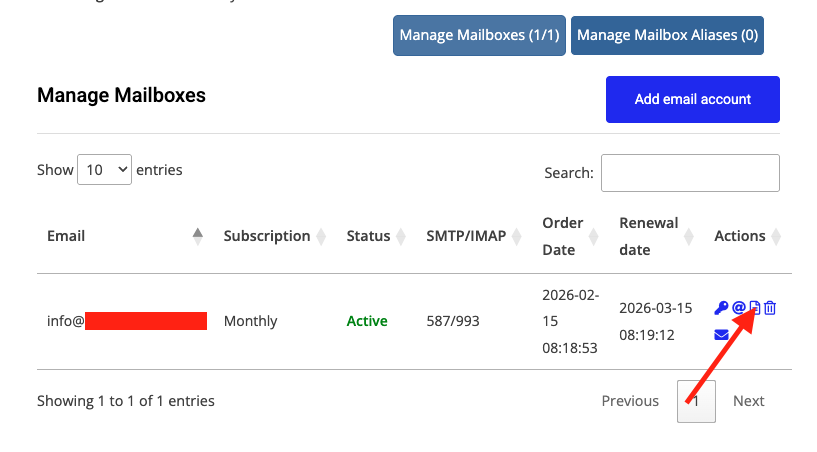
Once you click on the DNS button, you will find the records.

